UpDash Mail API · REST
A REST API that tells you what to do next.
Every endpoint lives under api.updash.com/v1 and speaks JSON. Errors say how to fix them, most responses name the next call, and nothing prints until a person approves it. The full reference is in the docs.
{"campaign": {"id": "20b6b4d9-f321-41ef-aa5e-c1db05b559fd","mode": "test","name": "November service reminder","dealer_id": "05720507-ac60-4915-977e-f12e9cd29b3f","product_code": "postcard_6x9","status": "draft","status_label": "Draft","creative_version": null,"audience_version": null},"next_step": "Upload the audience: upload_audience (POST /v1/campaigns/{id}/audience)."}One Bearer key decides the partner and the mode
Send the key on every /v1 request. Another partner's ids answer 404, so ids cannot be probed.
curl -s $API/v1/products \
-H "Authorization: Bearer $KEY"- Sandbox
- Keys start xm_test_. Nothing prints or mails, and Xcel staff never see the orders.
- Live
- Keys start xm_live_, for real orders once Xcel switches on live ordering for your company after onboarding. Ask for live access.
- Storage
- Shown once and stored only as a hash. Keep keys server-side: never in a browser, an app or a chat.
- Failures
- A missing, malformed, unknown or revoked key always gets the same 401, so a caller learns nothing about which.
| Setting | Sandbox xm_test_ | Live xm_live_ |
|---|---|---|
| Data | Separate from live; a test key never sees a live campaign | Separate from the sandbox |
| Dealers | Creates its own test dealers, and writes to them save. A write to a shared dealer (the sample dealer, or one your live key or Xcel created) only validates and saves nothing | Sees shared dealers, never test dealers; a write saves a new profile version |
| Address processing | Simulated; every address passes | CASS and NCOA, run by Xcel staff |
| Approval link | Returned as review_url, with sandbox_only: true | Emailed only to a registered approver; never returned |
| Deciding from a script | POST /v1/test/campaigns/{id}/approval, for CI | Refused: only the approver decides |
| Quotes | Your price per piece at your volume tier; nothing is billed | Your price per piece at your volume tier, charged when the order is sent |
| After submit | Nothing prints; a test endpoint simulates production and results | Xcel's production team checks and prints each order; results come from UpDash every 6 hours from the day the order goes into production |
| Phone on the piece | The dealer's phone, or a number you send | The dealer's phone, or a number you send; the API issues no tracked number |
Every error says how to fix it
Every /v1 error and every MCP tool error has the same body. Branch on code, show message to a person, do what fix says.
- Bodies
- JSON in and out, apart from files: CSV for audiences, dealer imports and do-not-mail lists, images for logos and assets, and the PDF or HTML a preview can answer. An empty body counts as {}.
- Clients
- Plain HTTPS, described by an OpenAPI 3.1 file. The docs carry a Postman collection, runnable Node, Python and MCP examples, and the guide to a pre-release TypeScript SDK, @updash/mail-api. It is not on npm yet, so ask Xcel for the package.
- Values
- snake_case fields. Money in integer cents (total_cents). Times in ISO 8601 UTC. Ids are UUIDs.
- next_step
- Most responses that change state name the next call. GET /v1/campaigns/{id} always has one.
- X-Request-Id
- On every response. Quote it when you report a problem.
- Limits
- AI copy calls are capped per day and proof renders per hour.
{"error": {"code": "invalid_request","message": "name: Invalid input: expected string, received undefined","fix": "Correct `name` and retry. See /openapi.json for the request schema.","field": "name"}}An Idempotency-Key makes a retry safe.
Submit is the only call that commits spend, so it needs an Idempotency-Key header. Generate one per order and keep it.
IDEM=$(uuidgen)   # one key per order; keep it for retries
curl -s -i $API/v1/campaigns/$C/submit \
  -H "Authorization: Bearer $KEY" \
  -H 'content-type: application/json' \
  -H "Idempotency-Key: $IDEM" \
-d "{\"approval_id\":\"$A\"}"- The same key, campaign and approval within 24 hours returns the stored response with Idempotent-Replayed: true.
- While the first request runs, a repeat gets idempotency_in_progress.
- Refusals are not stored, so you can fix the cause and retry with the same key.
- Submit checks the approval, the quote, the spend ceiling and the dealer's monthly cap again, inside one transaction.
Templates that take each dealer's brand
Xcel's twenty-four templates cover the three formats: 9 x 6 postcards for trade-ins, service, declined repairs, shoppers, conquest, ownership anniversaries, loan payoffs, open recalls, thank-yous after service, upcoming service appointments, buyers who never came back for service, accessories for recent buyers and birthdays; tri-fold letters for high-mileage upgrades, ending warranties, unsold leads, service customers who bought elsewhere and payment reviews; and greeting cards for birthdays, lost service customers, new owners, showroom visits that didn't end in a sale and the holidays. Each takes the dealer's logo, colors, address, hours and signer from its profile; your copy and each row of the list fill the rest. Preview any of them before you create a campaign, or send your own HTML or print-ready art.
| Products include |
|---|
postcard_6x99 x 6 postcard, 9.25 x 6.25 in with bleed |
card_8_5x11_6x9envGreeting card: 8.5 x 11 card stock folded in half, in a 6 x 9 envelope |
letter_8_5x11_10winTri-fold letter: 8.5 x 11, folded in thirds, in a #10 envelope with no window |
GET /v1/productsThe products, their print specs and their templatesGET /v1/templatesTemplates by product, use case or a queryPOST /v1/templates/{code}/previewA proof of one template, before any campaign exists
postcard_6x9_vehicle_in_demandSummit Auto Grouppostcard_6x9_vehicle_in_demand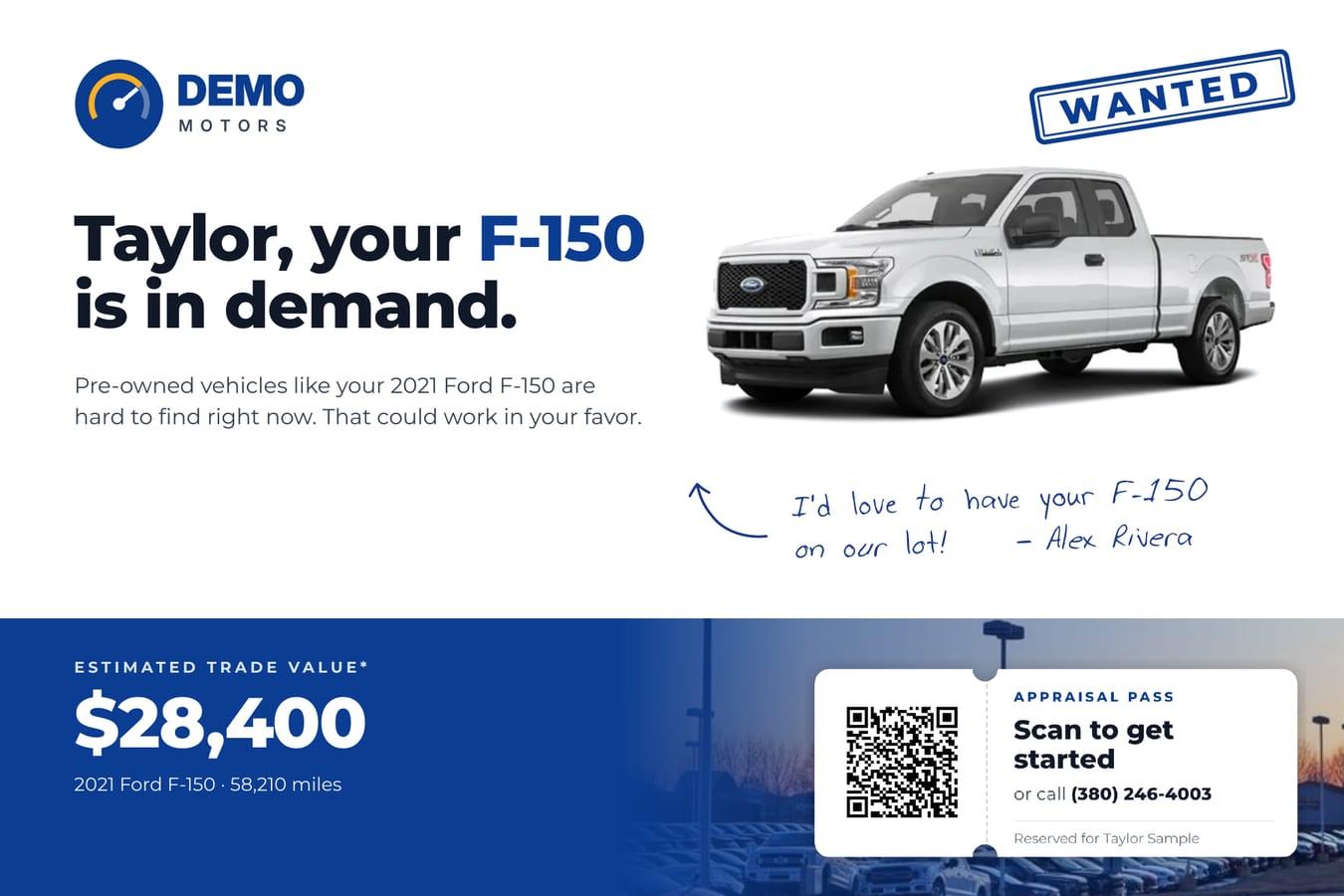

See every template, drawn for four dealers
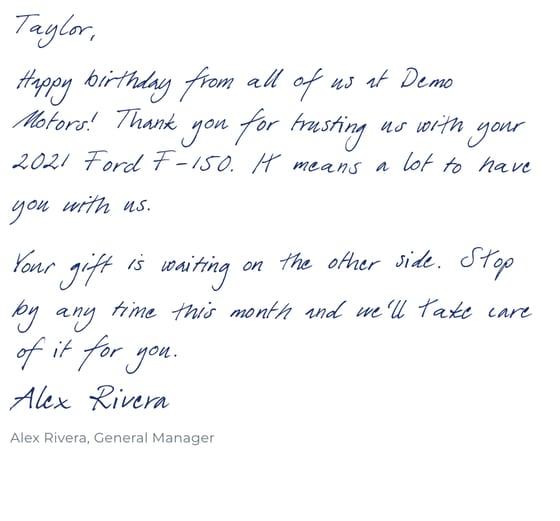
copy.handwriting, which sets the note, the signature and the gift tag. Leave it out for HW27. Each note is set the way a proof sets it.A signed POST for every event
Register an endpoint and stop polling. Each endpoint has its own secret, shown once. Payloads carry ids, statuses and counts, never customer data.
campaign.status_changedAny status change, with the actor and the reason
audience.completedAn uploaded audience was processed: counts only
audience.address_processedLive: Xcel finished CASS and NCOA
audience.purgedAn audience's files were deleted, by the retention job or a delete call
creative.generatedA creative version was stored, with preflight counts
quote.createdA quote was made
approval.requestedApproval was requested
approval.decidedA person decided on the review page, or a sandbox key through the test route
campaign.results_updatedThe result totals changed
campaign.lead_results_updatedLeads with new responses or matches, by external_id
campaign.results_linkedLive: Xcel linked the order to its tracking; results follow
dealer.updatedA dealer got a new profile version: field names, never values
POST /xcel/webhooks HTTP/1.1
Content-Type: application/json
User-Agent: XcelMailAPI-Webhooks/1
X-Xcel-Signature: t=1793631600,v1=966b8dbb07e9cd96491474095ab8092c…
X-Xcel-Event-Id: 1dc9a039-8d37-4566-9d9d-ed024a100a21
X-Xcel-Event-Type: campaign.status_changedimport crypto from "node:crypto";
// True when X-Xcel-Signature matches the raw request body.
export function verify(secret, header, rawBody, tolerance = 300) {
const parts = Object.fromEntries(String(header ?? "").split(",").map((p) => p.split("=")));
const t = Number(parts.t);
if (!Number.isInteger(t) || Math.abs(Date.now() / 1000 - t) > tolerance) return false;
const expected = crypto.createHmac("sha256", secret).update(`${t}.${rawBody}`).digest("hex");
return expected.length === parts.v1?.length &&
crypto.timingSafeEqual(Buffer.from(expected), Buffer.from(parts.v1));
}- Check the signature.
- HMAC-SHA256 of the timestamp, a dot and the raw body, keyed with the endpoint's secret. Reject a timestamp more than five minutes off.
- Drop duplicates.
- Delivery is at least once and order is not guaranteed. De-duplicate on X-Xcel-Event-Id and store the ids you have processed.
- Answer within 5 seconds.
- Any 2xx. A failure is retried after 1 and 5 minutes, then 30 minutes, 2, 6 and 24 hours: seven attempts in about 33 hours.
Operations under /v1
Built from a pinned copy of the API’s OpenAPI file. The current file is at api.updash.com/openapi.json, and the full reference is in the docs.
Catalog
The offered products, their print specs and their templates.
- GET
/v1/productsList mail products, specs and templates - GET
/v1/makesList the make logos - GET
/v1/makes/{make}/logoGet a make logo file
Templates
Browse Xcel's creative templates and your own saved templates, render a preview of any of them with your copy before a campaign exists (a preview saves nothing), and save your own HTML as a template with immutable versions.
- GET
/v1/templatesList templates - POST
/v1/templatesSave your own template (a new version) - GET
/v1/templates/{code}Get one template with its layout regions - POST
/v1/templates/{code}/previewRender a template without a campaign - GET
/v1/templates/{code}/versionsList a template's versions, newest first - POST
/v1/templates/{code}/retireRetire your own template - GET
/preview/{token}Open a template preview link (no API key)
Dealers
Create your dealers (a test key's are test dealers, test mode only), keep their profiles current (versioned, with ETag and If-Match), name their approvers, upload logos, keep a lasting do-not-mail list per dealer and import dealers from a CSV. Disclosures, the license number and spend caps are Xcel's.
- GET
/v1/dealersList or find your dealers, a page at a time - POST
/v1/dealersCreate a dealer with its profile version 1 - POST
/v1/dealers/importUpsert dealers from a CSV by external_id - GET
/v1/dealers/{id}Get one dealer - GET
/v1/dealers/{id}/approversThe dealer's registered approvers and the people you named - POST
/v1/dealers/{id}/approversName an approver: Xcel emails them a confirm link - GET
/v1/dealers/{id}/suppressionsThe size of the dealer's do-not-mail list and its last change - POST
/v1/dealers/{id}/suppressionsAdd a do-not-mail CSV to the dealer's lasting list - DELETE
/v1/dealers/{id}/suppressionsClear the dealer's do-not-mail list - GET
/v1/dealers/{id}/profileGet the dealer's profile - PUT
/v1/dealers/{id}/profileReplace the profile - PATCH
/v1/dealers/{id}/profileMerge-patch the profile - GET
/v1/dealers/{id}/profile/versionsList profile versions, newest first - POST
/v1/dealers/{id}/logoUpload the primary or reversed logo - GET
/v1/dealers/{id}/assetsList the dealer's creative assets - POST
/v1/dealers/{id}/assetsUpload a creative asset - GET
/v1/dealers/{id}/assets/{asset_id}Read one creative asset - PATCH
/v1/dealers/{id}/assets/{asset_id}Change an asset's label, name, title or department - DELETE
/v1/dealers/{id}/assets/{asset_id}Remove a creative asset - GET
/v1/dealers/{id}/offersList the dealer's offers - POST
/v1/dealers/{id}/offersAdd an offer - GET
/v1/dealers/{id}/offers/{offer_id}Get an offer - PATCH
/v1/dealers/{id}/offers/{offer_id}Change an offer - DELETE
/v1/dealers/{id}/offers/{offer_id}Remove an offer - GET
/v1/dealers/{id}/brandWhat a new creative prints for the dealer - GET
/v1/dealers/{id}/inbound-emailThe dealer's inbound email address for lists - PUT
/v1/dealers/{id}/inbound-emailTurn the dealer's inbound address on or off, set its senders, or rotate it
Asset library
Photos you upload once and print for any of your dealers: `{{asset.photo.<label>}}` prints a dealer's own photo with that label first, else yours. Shared by test and live keys; a key limited to some dealers reads it only.
- GET
/v1/assetsList your asset library - POST
/v1/assetsUpload a photo to your asset library - GET
/v1/assets/{asset_id}Read one library photo - PATCH
/v1/assets/{asset_id}Change a library photo's name, label or description - DELETE
/v1/assets/{asset_id}Remove a library photo
Campaigns
Create and list campaigns.
- GET
/v1/campaignsList campaigns (this key's partner and mode) - POST
/v1/campaignsCreate a draft campaign
Audience
Send an audience CSV (by source_url or as a CSV body in one call, or through a signed upload URL) and process it. Responses, events and logs never carry rows.
- POST
/v1/campaigns/{id}/audience/importImport an audience by URL or CSV body, in one call - POST
/v1/campaigns/{id}/audienceStart an audience upload (signed URL) - POST
/v1/campaigns/{id}/audience/completeProcess an uploaded audience - DELETE
/v1/campaigns/{id}/audience/{audience_id}Delete an audience version's files now
Creative
Fill a template with copy (or a brief), render and check the proof.
- POST
/v1/campaigns/{id}/creativeFill a template with copy, supply HTML, or send print-ready artwork - POST
/v1/campaigns/{id}/creative/artworkStart an artwork upload for a campaign (signed URL) - POST
/v1/artworkStart an artwork upload before a campaign exists (signed URL) - POST
/v1/artwork/previewCheck print-ready artwork before a campaign exists - POST
/v1/campaigns/{id}/proofRender and check the proof - GET
/v1/campaigns/{id}/validateReadiness checklist and preflight issues (read-only; same as POST) - POST
/v1/campaigns/{id}/validateReadiness checklist and preflight issues (read-only; GET also works) - GET
/preview/artwork/{token}Open an artwork preview link (no API key)
Quote and approval
Quote the campaign, ask a human to approve, and submit.
- POST
/v1/campaigns/{id}/quoteQuote the current creative and audience - POST
/v1/campaigns/{id}/approvalRequest human approval - POST
/v1/campaigns/{id}/submitSubmit an approved campaign
Status
Campaign status, next step, the timeline and results.
- GET
/v1/campaigns/{id}Campaign status, counts, approval state and next step - GET
/v1/campaigns/{id}/resultsTimeline, quantities and results - GET
/v1/campaigns/{id}/leadsWho is on the campaign's current audience - GET
/v1/healthLiveness for an uptime monitor - GET
/v1/accountWho this key acts for, and whether live ordering is on - GET
/v1/leadsEvery campaign a shopper is on
Sandbox
Test-key only: simulate production statuses.
- POST
/v1/test/campaigns/{id}/approvalSandbox only: decide a pending approval from a script - POST
/v1/test/campaigns/{id}/advanceSandbox only: simulate the next production status
Webhooks
Register and list signed event endpoints, send a test event, list deliveries and replay one, and read your past events for a time window.
- GET
/v1/eventsYour events for a time window, oldest first - GET
/v1/webhooksList webhook endpoints with their latest delivery (secrets never shown) - POST
/v1/webhooksRegister a webhook endpoint (secret shown once) - DELETE
/v1/webhooks/{id}Deactivate a webhook endpoint (idempotent) - POST
/v1/webhooks/{id}/rotate-secretRotate an endpoint's signing secret (new secret shown once) - GET
/v1/webhooks/event-typesEvery event type, with what it says - POST
/v1/webhooks/{id}/testSend a signed test event now and report what the endpoint answered - GET
/v1/webhooks/{id}/deliveriesOne endpoint's deliveries, newest first (never the body) - POST
/v1/webhooks/{id}/deliveries/{delivery_id}/replayQueue a past delivery to send again
Keys
Make, list and revoke keys limited to some dealers, so each store can hold its own.
- GET
/v1/keysList API keys - POST
/v1/keysMake a key limited to some dealers - DELETE
/v1/keys/{id}Revoke a limited key (idempotent)
Standing orders
Save a repeating mailing once and turn each new list into an order with one call, or on a schedule: people mailed within a window are skipped, and every run's order still waits on the dealer's approver.
- GET
/v1/standing-ordersList standing orders (this key's partner and mode) - POST
/v1/standing-ordersSave a standing order - GET
/v1/standing-orders/{id}Get a standing order and its last runs - PATCH
/v1/standing-orders/{id}Change, pause or resume a standing order - DELETE
/v1/standing-orders/{id}End a standing order - GET
/v1/standing-orders/{id}/runsList a standing order's runs - POST
/v1/standing-orders/{id}/runsStart a run: turn a list into an order
Try it in the sandbox
Get a sandbox key. The OpenAPI file and the full docs are at api.updash.com/docs. Nothing in the sandbox prints. Ready to go live? Ask for live access.
Or text 305.877.3881 and a person writes back.